
Contact Info
WINNIE the Scoop! Newsletters
The WINNIE the Scoop! is provided the first Thursday of each month. Topics will be removed once no longer timely or pertinent. Information that can be found on other WINNIE pages is removed the following month:
- Tips, best practices, and common questions about how WINNIE works can be found on the WINNIE User Tips page.
- Bugs and issues can be found on the WINNIE Bugs & Issues page.
Some information is also sent to WINNIE users via email. If sent in the past two months, it can be found on the MIS & Data Unit Communications page.
Oct. 1, 2026
Upcoming important dates
- Thursday, Oct. 1 – new State Use Question on Demographics
- Friday, Oct. 9 – Infoview maintenance – some short interruptions may occur
- Friday, Oct. 16 – Deadline for updating SWIPe
- Saturday, Oct. 17 – WINNIE Release 3.7.1 installed on Production
- Monday, Oct. 19 – Begin annual cash-value benefit (CVB) increase ($1) for some participants
- Sunday, Nov. 1 – Daylight Savings Time ends – set your clock back one hour
Annual CVB adjustment
This information will be provided in the Oct. 7 Weekly Update as well.
Due to WIC regulations, CVB amounts require annual inflation adjustments. On Oct. 19, default food packages for the following participants will be increased by $1 (no other CVB amounts are impacted by this adjustment).
- Children: $26 to $27
- Pregnant with multiples: $52 to $53
- Mostly-breastfeeding (MBF), MBF multiple infants, and pregnant and MBF: $52 to $53
- Fully breastfeeding (FBF) and pregnant and FBF: $52 to $53
- Fully breastfeeding multiple infants: $78 to $79.50
Beginning Oct. 19, CPAs must create a new default food package with the increased CVB amounts for the participants listed above when issuing benefits. These changes can be made over time when CPAs next meet with participants. Agencies are NOT required to void and reissue benefits that have already been issued.
For future food packages, you can either manually edit the CVB amount or delete the food package and add a new default food package.
Updates to the No WIC Formula/Foods Issued Item
This information will be provided in a memo in the Oct. 7 Weekly Update as well.
The No WIC Formula/Foods Issued non-contract formula food item allows agencies to count participants receiving nutrition services but not food benefits. Previously, this option was only available for infants and children. However, to support consistent statewide practice, this option is now also available for women categories (pregnant, breastfeeding and non-breastfeeding) in WINNIE.
CPAs may select No WIC Formula/Foods Issued for women in situations where issuing benefits is not appropriate or feasible, but you are still providing nutrition services. Some examples include:
- A pregnant participant hospitalized for an extended period.
- A postpartum participant who is incarcerated.
- A participant residing in a treatment facility where food is provided and WIC foods cannot be used.
The guidance for providing this food item has been updated and applies to all participants being issued the No WIC Formula/Foods Issued item. To issue this food item:
- Verify the participant for whom you want to issue this item is currently living in Minnesota.
- For women and children - in Health Information: Toggle on Food Package III and save. This is necessary for FORMULA to display in the Base Food Category dropdown when creating the food prescription.
- In Food Prescription:
- Click Add Food Prescription.
- Select the Effective Date.
- Click Add.
- Select FORMULA from the Base Food Category dropdown.
- Select Non-Contract from the Formula Type dropdown.
- Select No WIC Formula/Foods Issued from the Food Item dropdown.
- Click Save.
- In Issue Benefits:
- Issue the No WIC Formula/Foods Issued benefit for the appropriate length of time (e.g., 1 or 2 months) that the participant will not be receiving WIC food benefits.
- Toggle on Direct Ship.
- Complete the Direct Shipped Items card for each month.
- Ship To: In Stock
- Direct Ship Quantity: 1
- Required documentation for all participants (women, infants, and children) issued this item:
- Document the specific nutrition services (education, etc.) provided at the contact.
- Add a general note (subject = Benefit Issuance) describing the situation and why the No WIC Formula/Foods Issued was provided.
The MN Operations Manual will be updated with this information. Please reach out to your state WIC consultant with questions.
Text Messaging Information on Local Agency webpage
We’ve added a new Text Messaging dropdown in the Information System section of the Local Agencies webpage. The dropdown has links to a new Text Messaging and WIC webpage with an overview of policy and guidance, the New Text Messaging Documentation (PDF) memo sent in the Sept. 23 Weekly Update, and Mobile Management, which has information about its Group Text Messages feature. We will continue to add to this as more clarifications, such as questions and answers, and updated guidance (such as policy revisions) become available.
Infoview maintenance on Oct. 9
Gainwell will be doing some maintenance on the Infoview server during the afternoon of Friday, Oct. 9. You can continue to use Infoview during this time, but you may experience a short interruption and possibly get kicked out of Infoview. If this occurs, you should just be able to log back in and continue using it.
Reminders!
New version of SWIPe must be installed before Oct. 17
The following information was previously provided in the Sept. 9 Weekly Update and Sept. 10 MIS & Data Communications email.
A new version of SWIPe (msi file 1.0.26110.6) is now available on FileZilla and can be downloaded from the agencygateway >> SWIPe folder. You will need a local administrator account to update SWIPe and should contact your county IT for assistance. The new version of SWIPe must be installed before the next WINNIE release, which will be installed on production on Saturday, Oct. 17.
Please note that any previous versions of SWIPe should be uninstalled before installing the new version. Having multiple versions of SWIPe installed at the same time can result in issues when using WINNIE.
WINNIE Release 3.7.1 – installation on Saturday, Oct. 17
The following information was previously provided in Sept. 10 MIS & Data Communications email.
Installation
Gainwell will be installing WINNIE release 3.7.1 on Saturday, Oct. 17. All WINNIE environments (Production, Training, Mobile Management, and Infoview) will be unavailable from 8 p.m. on Friday, Oct. 16 through 7 a.m. Monday, Oct. 19.
On Oct. 19, the first day of clinic after installation, it may take longer to login as the system pulls down new information to your computer.
Release Document
A WINNIE Release 3.7.1 Document (PDF) is available on the WINNIE Release & Update Documents page on the MDH WIC website and should be reviewed by all WINNIE users prior to Oct. 19. This document details 8 bug fixes that impact the WINNIE clinic application.
Staff can register for the WIC app
If interested in registering a household in the WIC app for training purposes or to become more familiar with how the app works, you can contact Nicole Danberry (nicole.danberry@state.mn.us) or Tobi Afolabi (tobi.afolabi@state.mn.us) to obtain a card number, date of birth, and zip code associated with a Compliance Buy card.
Your agency manages its own referrals
Staff with Agency Admin rights can add, update, and maintain referrals for your agency. All referrals are agency-specific in WINNIE. Despite this, remember that you must include your 3-digit Agency ID within a set of parentheses at the end of the referral name. Please refer to the Maintaining Referrals training module for more guidance.
Group Text Messages in Mobile Management
Information about the new Group Text Messages feature in Mobile Management was provided in the Sept. 16 Weekly Update memo, Group Text Messages in Mobile Management (PDF). Information has also been added to the Mobile Management section of the Other Information System Training page of the MDH WIC website.
New State Use Question – Consent for Communications
On Oct 1, the new State Use Question, Text Message Release Documentation, started to display on the Demographics page and some information about how to complete the question was provided in the Sept. 23 Weekly Update New Text Messaging Documentation (PDF) memo.
As a follow-up, the following was sent in an email on Wednesday, Sept. 30:
The State Office has received a number of questions from Local Agencies about the new Consent for Communication materials that went out in the Sept. 23 Weekly Update. We are working on responses and will be posting and sending out a Q/A document next week in the Weekly Update and Thursday email.
As we work to answer these questions, the following are some things that agencies can do now:
1. Review and revise your current Release of Information (ROI) and update to include the new language from the Consent for Communication. If you do not wish to update a local agency specific form you can use the ROI template provided by the State Office (MOM, Exhibit 1-C ) that has been updated with the new language.
2. Your agency can choose to remove the Consent for Communication from your Local Agency ROI and use the State provided Consent for Communication as a separate form.
3. If you do not need a full release of information for a participant, you should use the state provided Consent for Communication form without modifications.
4. You should begin to document in WINNIE in the State Use field for the Text Message Release Documentation. If you choose to wait for further clarification before documenting, you can select the RESPONSE NEEDED and then complete the form at the next contact.
5. Reach out to your consultant with questions.
Sept. 3, 2026
WINNIE training database refresh – UNAVAILABLE Sept. 15
The WINNIE Training database will be refreshed on Tuesday, Sept. 15 and will be UNAVAILABLE.
All existing training accounts are deleted as part of the refresh process. Any agencies wanting to use WINNIE Training after the refresh on Tuesday, Sept. 15, will need to contact the Help Desk after the refresh has been completed to have your agency’s training account re-created. The earliest the Help Desk can re-create your training account is the day after the scheduled quarterly training database refresh, or Wednesday, Sept. 16.
To contact the MN Help Desk: call 1-800-488-8799, press 2, 2 or email them at mnhelpdesk@gainwelltechnologies.com.
Infoview
One of the projects we will be working on in the following year or more is to review all Infoview templates, updating and correcting queries, archiving old or obsolete templates (such as those providing redemption information), and combining them when possible. When we are done revising all the templates in a topic folder, we will provide some general information in a WINNIE the Scoop newsletter.
If you have a template you would like prioritized in this review process, please submit a Local Agency Report & Data Request.
Referral templates
All of the Infoview templates in the INFOVIEW TEMPLATES >> Referrals folder have been updated and corrected, and the queries are now consistent across all reports. At this time, to keep it simple and because all of the information provided and outputs are different, we did not combine any of the templates.
Since all of the templates had corrections, if you are using a referral report, you should start using the revised template. We renamed all of them in an attempt to make the information the template provides more intuitive.
Below is a summary chart of all referral templates’ old titles, new titles, the unique information they provide, and their outputs for reference. For more information about the revisions and corrections for each report, please refer to the Referrals section of the Infoview Report Revisions and Corrections webpage.
| Old Title | New Title | Information Provided | Outputs |
|---|---|---|---|
| No Record of Specified Referral | Certs and MCA and Specified Referral(s) Never Given | Cert/MCA and never given specific referral(s). | 1 list and 1 cross-tab count by contact type, certifier, and clinic. |
| Participants with Cert or MCA and Specified Referral | Certs and MCAs with Specified Referral(s) Given | Cert/MCA and specific referral(s) given on same date as cert/MCA. | 1 list |
| New | Certs and MCA and Specified Referral(s) Never Given | Cert/MCA and not given ANY referrals on same date as cert/MCA. | 1 list and 1 cross-tab count by certifier and contact type. |
| No Referrals at Cert or MCA | Certs and MCAs without Specified Referral(s) Given | Cert/MCA and specific referral(s) NOT given on same date as cert/MCA. | 1 list and 1 cross-tab count by contact type, certifier, and clinic. |
| Certified Participants Referred and Not Referred | Certs with and without Specified Referral(s) Given | Cert and specific referral(s) given or not given on same date as cert. | 2 lists – referred and not referred. 4 cross-tab counts: race ethnicity or cultural identity, WIC type, certifier and clinic by referral(s), total referred, not referred and certified (including percentages). |
| Child Recertification by Age & Specific Referral Provided at Least Once – WINNIE Only | Child Recerts by Age at Recert and Specified Referral Given at Least Once | Child recert by age at recert and specific referral given at some point. | 1 list |
| Referral Organizations by Program Topic | Referrals by Topic – Agency and State | Specific agency’s referrals and all referrals statewide. | 4 lists |
| Referral Contact(s) at Any Time & Current Age | Specified Referral(s) Given at Least Once with Current Age | Participants belonged to agency when specific referral(s) given at some point. | 2 lists – infants/children and women. |
| Referral Contact(s) | Specified Referral(s) Given during Specified Dates with Age at Referral | Participants (with age as of referral) belonged to agency when specific referral(s) given during specific dates. | 2 lists (one simple). 6 cross-tab counts: race ethnicity or cultural identity, certifier, WIC type, clinic (households and participants), and age categories by referrals. |
| Referral Contact(s) during Specified Time Period and Current Age | Specified Referral(s) Given during Specified Dates with Current Age | Participants (with current age) belonged to agency when specific referral(s) given during specific dates. | 2 lists – infants/children and women. 1 cross-tab count: agency and referral counts by households and participants for specified dates and by WIC weeks during dates. |
Please note that although we revised and corrected the templates, we did not change how they identify referrals. In order for your agency’s referrals to be displayed in the reference tab and provide the Referral ID(s) necessary to enter into the prompt and run the report, all referrals should continue to have your agency’s ID in parentheses at the end of the referral name. (ex: PEER BREASTFEEDING – ACCEPTED (421)).
August 6, 2026
Medical formulary updates and No WIC Formula/Foods Issued
Content DELETED 10/12/26 per State Consultants.
Pending Proof of Income? Toggle on Pending Proof
It appears that some staff are forgetting to toggle on Pending Proof (found to the right of the Household Size field) on the Income page when selecting either PENDING PROOF – 30 Days for adjunctive programs or **PENDING PROOF** for itemized incomes. Toggling on Pending Proof is necessary to ensure the system limits issuance to only one month until proof has been provided and to prompt the general system alert “No proof of income was found. Review the income page.”, which displays for all active household members.
The following training modules provide guidance on how to record pending proof in WINNIE:
Two recently revised Infoview reports can also assist your agency with identifying staff that may need more training in how to document pending proof in WINNIE and to assess whether more than one set of benefits is being issued without proof of income being provided:
- PENDING PROOF NOT TOGGLED ON (Income folder)
- PENDING PROOF AND ISSUED MORE THAN ONE BENEFIT SET (Agency Management folder)
Reminders
Staff user access clean-up
This is a reminder to submit deactivation requests for staff who no longer need access. Use the new ACTIVE WIC STAFF Infoview template (previously titled STAFF IDS AND NAMES) found in the INFOVIEW TEMPLATES >> Staff Management folder to identify individuals who may no longer require system access.
Accessing WINNIE and browser “rules”
There are a few hard-and-fast browser rules for using WINNIE that you must always follow to ensure data syncing, transfer, and storage issues don’t occur and to protect the data we input.
1. No multiple tabs – It’s pretty common to open multiples tabs for the same site for our browser-based apps, but this is not allowed with WINNIE. You should only ever have WINNIE open in one browser tab at a time.
2. Only one browser – WINNIE should never be opened in more than one browser at the same time.
3. Only one WINNIE instance at a time – Separate instances of WINNIE (such as Training and Production) should never be open at the same time. Always close out of one before opening the other.
4. Only access WINNIE and Infoview using work computers and appropriate networks – Since WINNIE and Infoview are available on any computer, you may be tempted to access them on public or personal devices or use public Internet connections. This puts our participants’ personal and private data at risk, and you should only use your work computers, and appropriate county networks or VPN, to access WINNIE and/or Infoview.
When to use risk factor 425X
425X - Child Transitioning to New Age Category can be used as a work-around to allow you to create default food packages when there aren’t any age-appropriate risk factors. You should never assign it at a certification.
425X should only be used if you are unable to create a default food package because WINNIE has added a pseudo-cert and removed all assigned risk factors since none apply to the child’s current age category.
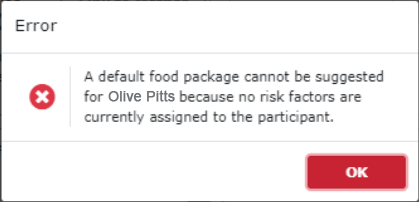
Two instances when you may see this are when an infant turns 1 year old prior to recertification and for children who have turned two years old.
An example of when it is appropriate to use this risk factor is provided in the Issue Benefits 4D – 3 Common Scenarios WINNIE training module.
Agencies can use the Infoview template, RISK FACTORS ASSIGNED AT CERTIFICATION, found in the INFOVIEW TEMPLATES >> Risk Factors folder to ascertain whether there are staff who may need more guidance about how to use this risk factor.
Table of Contents in WINNIE training modules
In case you aren’t already aware, you can easily reference specific information in all WINNIE training modules using the Table of Contents (TOC). Expand the TOC by clicking the double arrow icon in the top left corner of the module.
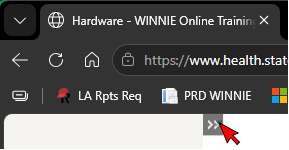
Sections with multiple slides display an arrow to the left of the section header. Click the section header to expand and view the individual slides in that section.
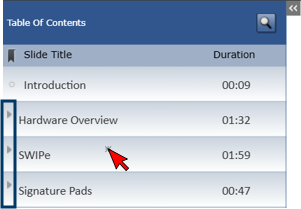
Click the first slide in that section to go to the start of that topic or click a specific slide to go directly to that slide.
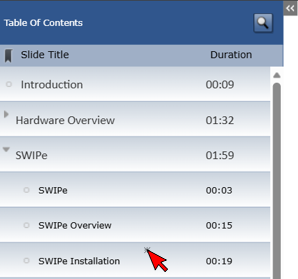
Training
Security training
Security training must be completed every fiscal year, and fiscal year 2026 ends Sept. 30, 2026. If you haven’t completed your training yet, you can find the security training on the WIC Other Information System Training page, which consists of 3 training and 3 review modules:
- Security Training 1: Data Security, Privacy, Breaches, and Cybersecurity Incidents (16 min.)
- Security Training 2: Physical and System Security (15 min.)
- Security Training 3: Access, Storage, Communications, and Sites with Data (14 min.)
Your agency must track security training, which requires your individual staff signature to indicate you have completed it. Agencies can use the Security Training Tracking (Word) document to help record staff completions.
July 2, 2026
Reminders!
Guidance for MPL income determinations
The following was provided in a June 29 MIS & Data Communication email.
Although the majority of our WIC participants are adjunctively eligible, we recognize that trying to calculate MPL incomes can be difficult and time-consuming. Below are two new documents to help with navigating the Minnesota Paid Leave portal to find the information necessary to be able to calculate MPL income.
- Minnesota Paid Leave (MPL) – Income Determination (PDF): provides step-by-step guidance for assessing MPL and household income, including screen shots of the MPL portal, and entering the information into WINNIE.
- Minnesota Paid Leave (MPL) – Income Determination (Quick Reference) (PDF): provides abbreviated steps in a "cheat sheet" format.
These documents can be found on the MDH WIC website:
- Local Agencies page in the Staff Resources section >> Certification Procedures dropdown.
- WINNIE Training page in the Income Assessment section under the Income 3A – Traditional Income training module.
Please contact your State Consultant with any questions.
WINNIE training
Training modules
The WINNIE training modules are a comprehensive review of all functionality and attempt to incorporate policy and requirements as well. They are detailed and try to address as many scenarios as possible, so that new staff can use the system with confidence. Training modules are referenced in the different phases of New Staff Training on the MDH WIC website. They are available for your use however best fits your agency’s training needs or methods.
Training environment
A Training environment is available for new staff to "play around" in WINNIE. They can use this to identify questions they might have about how something “works” as well.
Searching for topics
You can use the Table of Contents (TOC) to find specific information in a training module. Expand the TOC by clicking the double arrow icon in the top left corner of each module. You can click on different sections or slides in the TOC to jump to that part of the module. You can also use the script. Use CTRL + f to find key words/topics.
If you have any questions/suggestion about the WINNIE training, please use the WINNIE Questions for the State Office form to submit your questions/suggestion(s).
Infoview - deleting agency-specific folders
Next week, we will be deleting all agency-specific folders in Infoview. A few agencies requested we move some of their reports to the new *AGENCY REPORTS folder and this has been completed.
Moving forward, if you make changes to a template that are specific to your agency and would like to share the edited version of the template with other Infoview users in your agency, please contact sarah.mallberg@state.mn.us to have the report moved to the *AGENCY REPORTS folder so that other users in your agency can access it. We will save that version of the template with your agency’s name preceding the title.
June 4, 2026
DIRECT SHIP ONLY added to powdered formula descriptions in WINNIE
As of one year ago in June, we added the WIC Contract Formula – Powder food item so that families could choose the type of contract formula they want to use while at the store. Guidance at that time was to select this food item for all new infant food prescriptions for powdered contract formula and that existing food prescriptions did not need to be updated.
As this time, all infants issued powdered contract formula should have the WIC Contract Formula – Powder food item in their food package unless the powdered contract formula has to be direct-shipped for some reason.
To ensure the specific powdered contract formulas are only selected if they need to be direct shipped, we have added “DIRECT SHIP – ONLY” to their descriptions in the WINNIE Food Item dropdown.
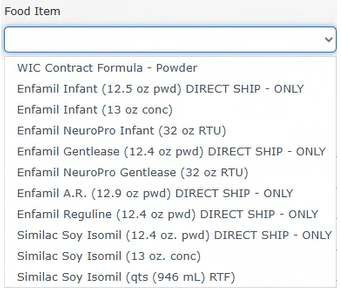
Agencies can use the FOOD AND FORMULA BY PFDTU Infoview template to identify infants whose food packages may need to be edited to provide the WIC Contract Formula – Powder food item. The Food Item IDs for the DIRECT SHIP - ONLY powdered contract formulas are: 153;399;405;409;411.
Best practice: change Household ID when foster family custody changes
A local agency asked a couple of questions about what happens in the WIC app and HyVee Aisles Online when a custody change occurs, and a household ID change is completed, or cards are deactivated/reassigned.
MN WIC App
Deactivating a card does not affect the participant’s registration within the MN WIC App. If a custody change occurs and the CPA simply updates the proxy and issues a new card, the previous proxy will still be able to view all information in the WIC app, including benefits, appointments, and certification details.
However, when a change Household ID is completed and the child is successfully moved to a new household ID, the previous household will no longer see that child’s information. This is because the “old” household ID no longer has any account data associated with that child.
HyVee Aisles Online
If a WIC card is added to an Aisles Online account, and that card is later replaced, it does not affect the Aisles Online account’s access to the benefits. This is because the technology through which Aisles Online works authenticates the shopper to the household’s WIC account, not just to a specific card. If there is a custody change, the previous proxy would still have access and that would need to be removed on the back-end.
However, when a change Household ID is completed, the “old” household no longer has access to any benefits, and if they attempt to use benefits through Aisles Online, the transaction will be rejected because no benefits remain associated with the “old” Household ID.
Best Practice
In lieu of these scenarios, best practice is to always change the Household ID when foster care changes occur, even when custody remains within the same county and it is just a new foster parent gaining custody.
Reminders
Provide feedback about Help Desk assistance
You can use the Minnesota WIC Help Desk Feedback Form to submit feedback you want to give about a Help Desk experience. This form is currently found on the Local Agency page in the Forms section under Feedback/Questions/Complaints and the Local Agency WINNIE Support page.
Infoview reports that need revision
If you use an Infoview report that has any of the following information in the output, please verify that you are using an updated version since the transition to WINNIE. All revisions are listed on the Infoview Report Revisions and Corrections page of the MDH WIC website. If your template hasn’t been updated, or if you're not sure it is working correctly, please request that the template be revised using the Local Agency Reports & Data Request. The following can cause issues with the report output:
- Staff IDs – displays SWEB IDs for all new staff.
- Income create date/time – overwritten when new household members added.
- Cultural Identity (state use) – will not show new records.
- Local Use Answers – will not show new records.
- New certifications – may not be accurate.
- New households/participants – may not be accurate.
New food calculators in WINNIE
You’ve probably noticed that the food calculators have looked different since Release 3.5.1 was installed last October. They’ve been added for all food items to allow flexibility if new federal substitutions rules are created in the future. For most food items, the Category Limit (maximum combined amount that can be provided), Allocated (amount currently in food package), and Remaining (amount that can still be added to the food package) are all that are pertinent. However, with the new substitution rules for juice/CVB and eggs/legumes, the Substitutions Available and Substitutions Made have been added to provide additional information.
To explain how they work, we’ll use eggs/legumes. Substitutions Available shows for the food item that has an amount that can be added (legumes) based on what was removed (eggs). For instance, if you remove/delete one dozen eggs, when viewing the calculator for legumes, it displays 16 since 16 ounces can now be added in lieu of the one dozen eggs.
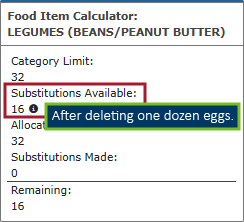
Clicking the information icon under Substitutions Available displays an explanation of the substitution that is available:

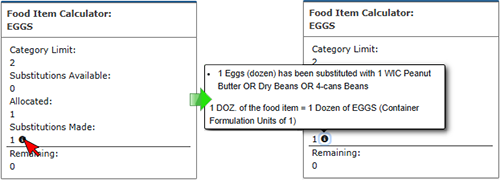
The Substitutions Made displays information for the food item that was decreased, or in most cases, deleted (eggs). In food packages 4-6, we won’t see this because they have only 1 dozen eggs and once deleted, you can’t view the eggs calculator. However, in Food Package 7 or 7+, where there are two or three dozen eggs, respectively, we can. If we were to decrease the eggs by 1 dozen, increase the legumes by a quantity of 1 (or 16 oz), and return to eggs, it would show that 1 substitution was made.

Clicking the information icon under Substitutions Made displays an explanation of the substitution that was made:
Whether these calculator changes are helpful or not, at least now you know how they work.
Infoview – new process for draft reports
We have a new process for agency review of requested new or revised Infoview templates. Once a draft has been completed and is ready for review, we will post the draft report to the new *DRAFT REVISIONS – Agency Review folder. Revised templates will be saved with the following format: <agency name> review – TEMPLATE TITLE (draft version #). Once the draft has been approved by the requesting agency, the guidance document has been completed, and the revised version posted, the draft template will be deleted from the DRAFT REVISIONS folder.
May 7, 2026
Reminders!
Some of this information was previously provided in MIS & Data Communication emails or the Weekly Update. New content is highlighted in the gray-shaded areas.
Reminder! Agency-specific Infoview reports
One of the projects the state will be working on is performing a thorough review of all current Infoview templates in an attempt to streamline the Infoview folders and their contents. We will be:
- Combining templates providing the same or similar information.
- Updating outdated or old templates that are still being used.
- Removing obsolete templates.
At this time, we are asking all agencies to thoroughly review the reports found in their Agency-Specific folder. Your agency, or your Infoview users, must ensure that any reports in your agency-specific folder you want to keep are saved to Personal Folders. We will delete all agency-specific folders and their current contents on June 30.
The following agencies have an agency-specific folder found under Public Folders >> INFOVIEW TEMPLATES >> Agency-Specific: Anoka, Bloomington, Blue Earth, Chisago, Countryside, Crow Wing, Dakota, Douglas, Fond du Lac, Hennepin, Horizon, Kandiyohi, Leech Lake, McLeod, Mille Lacs, Nicollet, Olmsted, Pipestone, Rice, Scott-Carver CAP, Sherburne, Sibley, St. Louis, St. Paul-Ramsey, Stearns, Washington, White Earth, Winona, and Wright.
NEW CONTENT!
Saving to Personal Folder
If you aren’t sure how to save a template to your Personal Folders, please refer to the Infoview Training Module 4: Saving, Exporting, and Input Controls for guidance. (Open the Table of Contents and select Saving reports.)
Keeping agency-specific templates for future use
If you have an Agency-specific report that you would like to remain as a template for new staff to be able to use/access, please send the exact title of the report in your Agency-Specific >> county folder to Sarah.Mallberg@state.mn.us. We will review the report to ensure it isn’t already available as an INFOVIEW TEMPLATE. If it is unique to your agency, we will move the report to a new “Agency Reports” folder and add your county name to the title so that it is still available after June 30.
Please contact Sarah.Mallberg@state.mn.us with any questions.
High risk resolutions and pseudo-certs – follow-up
CPAs can resolve system-assigned high risk when it is no longer appropriate. However, CPA resolved high-risk is not maintained when a pseudo-cert is created. (A pseudo-cert is a new record added to the table where certification information is stored.) We can see that a pseudo-cert has occurred on the Risk Factors page when a risk factor is assigned or resolved or the WIC Category changes. However, there are instances that create a pseudo-cert that may not be obvious, or viewable, in WINNIE and we followed up with the WINNIE software contractor to see what other actions within the system can cause pseudo-certs.
The following is a list of other actions that will create a pseudo-cert and can cause the CPA high-risk resolution to revert:
- CPA saves Health Information and the breastfeeding amount has changed (e.g. fully breastfeeding to mostly breastfeeding, or to not breastfeeding).
- CPA saves Health Information and the participant's WIC category has changed (e.g. breastfeeding to non-breastfeeding).
- CPA saves a Nutrition Assessment Contact and interview answers are linked to risk factors.
- User saves Demographics and household fields tied to risk factors have changed (e.g. homelessness, migrant status).
- CPA completes a Mid-Certification Assessment that results in BF amount or category changes.
- End-of Day triggers an automatic category change from infant to child the night an infant turns one year old.
Infoview search - update
Although the Infoview search function no longer errs out, it still doesn’t appear to be working correctly. Gainwell is continuing to research how to complete the fix.
April 2, 2026
Security training updated
The security training modules have been updated with more information about electronic communications, Multi-factor Authentication (MFA), Mobile Management, and cybersecurity incidents. The review module has been divided into three modules; one for each training module that focuses on the specific topics covered.
All staff are required to complete annual security training each federal fiscal year (between Oct. 1 and Sept. 30).
Security training is found on the WIC Other Information System Training MDH WIC webpage.
March 5, 2026
Do NOT enter false data into WINNIE! Remember to issue last set of benefits for breastfeeding women first
We’ve learned from the Help Desk that some users are changing and entering false data into WINNIE. They are entering false data to work around no longer being able to issue the last set of benefits to a breastfeeding woman. Entering false data into the database is NOT allowed.
If baby has turned one year old and a breastfeeding mom has not yet received the last set of benefits that she is eligible to receive (Printed First Date to Use before Cert End Date), you must remember to issue her last set of benefits before updating the Breastfeeding Verified Date in Health Information. You do NOT need to update this date before you can issue to mom; it only needs to be updated to issue benefits to the infant/child.
If you are updating Health Information and you see the following message that specifically tells you mom is going to be terminated, you must click NO.
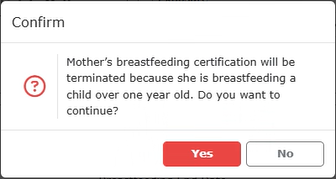
After clicking No on the message, exit Health Information without saving and issue mom’s benefits.
If you click Yes on the message and are in the participant folder or certification mode, you will not be able to issue the last set of benefits to mom and you will have to call the Help Desk. The Help Desk may be able to assist you with providing the last benefit set.
(NOTE! You cannot correct this by removing the incomplete certification since any changes to infant/child Health Information are maintained.)
New State Use Question option
A new option for the First time formula/other given to infant (meds ok) State Use Question will be available beginning Friday, March 6, 2026. You can now select “BF, donor milk, and formula given in the hospital” if the infant was fed by all three methods during their hospital stay. This will allow us to more accurately track both formula exposure and donor milk usage for WIC participants. Guidance and definitions can be found in the Breastfeeding Exclusivity document in the INFOVIEW TEMPLATES >> State Use Questions >> Breastfeeding Exclusivity folder in Infoview.
Use hot keys to quickly select from dropdowns
After you’re familiar with the items in a dropdown, you can speed up selection using hot keys. Start typing the first few alphanumeric characters of the option you want, and the dropdown will filter or highlight matching entries automatically. Some dropdowns, especially Nutrition Education, can be more difficult to become familiar with due to the sheer number of topics.
As a potential reference, a new Infoview template called NUTRITION EDUCATION TOPICS LIST is now available in the INFOVIEW TEMPLATES >> Nutrition Education folder. This report has two tabs, PRIMARY and SECONDARY, and groups Nutrition Education topics by WIC type.
New Infoview report available – assignment of 400 risk factors
Per MOM, Section 5.3.4, a dietary risk factor should be assigned as part of the complete nutrition assessment performed during certifications. If a dietary risk factor is not identified, risk factor 428 (4-23 months) or 401 (2 years and older) should be assigned.
Please note that Risk Factor 425X should never be assigned at a certification. This should only be assigned when you are unable to create a default food package because the participant does not have any applicable risk factors (risk factors were resolved in a pseudo-cert due to none applying to a new age category). See Issue Benefits 4D – 3 Common Scenarios WINNIE training module for when and how to correctly use this risk factor.
A new Infoview report (requested by a Local Agency), NOT ASSIGNED 400 (DIETARY) RISK FACTORS AT CERT, is now available in the INFOVIEW TEMPLATES >> Agency Management >> Audits/Chart Reviews folder and can help your agency assess whether this requirement is being met.
February 5, 2026
Reminders!
Do not issue 4 months of benefits
WINNIE will sometimes suggest 4 months of benefits, and participants should only be issued a maximum of 3 months of benefits at one time. We usually see a fourth set being suggested when a new member is added to a household and some of the existing members have already received benefits. The system provides a partial for the new member with a Printed First Date to Use (PFDTU) in the current month plus 3 additional months with PFDTUs in the next three following months. (This is not the same as providing a partial and full package where the PFDTU both fall into the same month.) In these instances, the new member should only be issued the partial and two following months, maintaining the household’s current tri-monthly issuance.
Infoview advanced concepts training modules available
If you’ve ever repeatedly modified your Infoview reports after exporting them or wondered how to organize your reports, these Advanced Concepts training modules may be helpful to you. The intent is to help you become a more effective and efficient user of Infoview. You don’t have to watch all the modules in their entirety; each training module has a Table of Contents that will help you find the topic you might want to review.
- Infoview Training 5A – Advanced Concepts: Managing Personal Folders (6 min.) – copy/paste templates to folders; move reports; add and rename folders.
- Infoview Training 5B – Advanced Concepts: Intro to Design Mode (7 min.) – design mode; advanced refresh; high-level overview of formulas, queries and dimensions.
- Infoview Training 5C – Advanced Concepts: Modifying Report Outputs 1 (9 min.) – add, rename, and delete columns; undo; format headers and cells; format tables.
- Infoview Training 5D – Advanced Concepts: Modifying Report Outputs 2 (9 min.) – move columns; format text; sort data; format tabs.
- Infoview Training 5E – Advanced Concepts: Adding Filters (11 min.) – add, edit, and delete input controls; use variables as filter.
These training modules can be found under Infoview on the Other Information System Training page of the MDH WIC website.
January 8, 2026
Always delete food items being replaced before adding new
Best practice is to always delete the food items you are replacing before adding the new food items when tailoring or adjusting food packages. The reason for this is twofold.
First, due to how the maximums are set in WINNIE, adding a food item before removing the unwanted food item will exceed the maximum amount allowed. For example, if you want to exchange yogurt for 1 quart of milk, you cannot add the milk until you’ve removed the yogurt.
Second, WINNIE allows over-issuance when providing infant fruits/vegetables and infant cereal for children and women receiving Food Package III. The reason for this is that the maximums allowed for these food items are separate from the CVB and regular cereal so a combined maximum cannot be assessed. If you were to add infant fruits/vegetables before removing the CVB, the system would not remind you to remove the CVB and if you don’t remove it, you will over-issue.
Infoview tip! Remember to select Personal Folders when saving templates
When saving your own version of a template, Infoview defaults to the INFOVIEW TEMPLATES folder in the Save As modal, not your Personal Folders. Remember to select Personal Folders when saving. Otherwise, an error will display indicating you don’t have the rights to save the template.
December 4, 2025
Questions/suggestions from Local Agencies
Appointments in the App
Is there a way for the appointments tab to indicate to the participant if the appointment is virtual or in person?
Currently, the only way to designate an appointment as virtual is by scheduling it at a TeleWIC Appointment Clinic since only the clinic address displays in the app (and not the appointment type).
If scheduled at this clinic, TELEWIC APPOINTMENT displays in the app, and staff would need to ensure that participants understand that this type of appointment does not require them to attend the appointment in person.
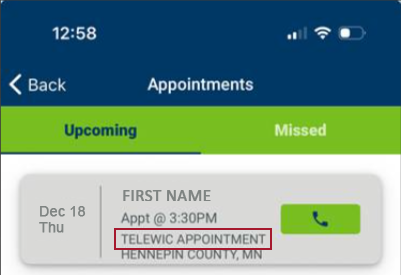
Coordinators at agencies that don’t currently have the TeleWIC Appointment Clinic can request it using the Change Grantees, Agencies or Clinics in IS and/or on MDH Website form.
November 6, 2025
Reminder! When contacting the MN Help Desk, you must provide…
This is just a reminder that when you contact the MN Help Desk, you will be required to provide the following information:
- Your first and last name.
- Agency ID.
- Description of the issue.
- State WIC ID or Household ID (if appropriate).
This information allows both the Help Desk and the State to track issues that may be occurring at agencies and for specific users.
You can contact the Help Desk by calling or via email:
- Call: 1-800-488-8799, press 2, 2 (non-critical)
- Email: mnhelpdesk@gainwelltechnologies.com
Reminder! Infoview reports still need corrections
This is just a reminder that there are many Infoview reports that still need corrections since our transition to WINNIE. Any reports that provide information about new certifications, local use answers, state use answers, and staff ID will require revising to ensure accuracy. At this time, the State Office is only correcting reports based on requests from local agencies to prioritize revising reports that are currently being used. You can view corrected reports on the Infoview Report Revisions and Corrections page.
Questions/suggestions from Local Agencies
Race/ethnicity selection
Can there be an “Other” option for race/ethnicity if a participant does not feel any of the race options align with how they would describe themselves?
Unfortunately, we are limited by federal requirements on the selections we can provide for race and ethnicity. The Racial and Ethnic Data Collection (PDF) tool includes some helpful descriptions that can facilitate a participant’s selection, including some ideas for those who identify as Hispanic or Latino, and there is some clarifying information on the WIC Civil Rights Resources page as well. Please note that if a participant refuses to self-select, you must select based on your perceptions of the participant.
Benefit redemption
For a family with multiple household members (a woman, child over 2, and child under 2) with the WIC-allowed milk food item:
If they are buying evaporated milk, whose food package does it come off from? Does the fat content of the evaporated milk purchased make a difference?
The fat content is important since 1–2-year-old children, in general, should be receiving the Whole Milk (WIC-allowed) food item while children over 2 and women are receiving the Fat Free/Skim Milk or 1% (WIC-allowed) food item. If they buy a combination of lower fat and whole evaporated milk, it will pull the low-fat item from either the older child or woman’s benefits and the whole from the 1–2-year-olds benefits. If they buy only whole evaporated, it will only come off the 1–2-year old’s benefits.
How about soy milk?
Soy beverage is different in that it can only be purchased if issued the Fat Free/Skim Milk or 1% (WIC-allowed) food item. You can issue this to 1-2 year old children because it is the only option for soy (and goat milk). Please refer to the Food Package Changes to Implement on June 9 (PDF) memo for this information and reference.
Is there an order to which household member a food item is removed from first, such as for the cereal or the fruit and vegetable benefit?
No and yes. For most food items that are issued to multiple family members, the order appears to be random (it is actually based on some internal number assigned by the eWIC processor but looks random to us). For example, although two members may both have cereal and eggs, in one transaction, the eggs may be removed from member 1 while the cereal is removed from member 2. This is why Adjust Benefits aggregates food items issued to multiple members, so that regardless of the benefit transaction, as long as the household total is greater than the redeemed, you can still make changes to the food item for any of the members issued that food item.
That said, there are certain food items, like yogurt that is removed from the member issued the more “restrictive food item” first. For example, mom is issued the Yogurt (low fat/nonfat) option while her 1–2-year-old child is issued Yogurt (any WIC-allowed). The low fat/nonfat food item issued to mom is more restrictive because only low fat/nonfat yogurt can be purchased while both low fat/nonfat OR whole yogurt can be purchased with the any WIC-allowed option. So, when the family buys a low-fat yogurt, since that is the more restrictive food item, it will come off of mom’s benefits first.
Please note that although this information may be helpful to staff in some way, participants should always be referred to their aggregated benefit balance in the app.
October 2, 2025
WINNIE Questions & Answers webpage removed
We have removed the WINNIE Questions & Answers webpage since it was created to house local agency questions and answers before we transitioned to WINNIE. Any still pertinent information has been moved to the WINNIE User Tips page.
Please contact the MN Help Desk (1-800-488-8799, press 2, 2 or mnhelpdesk@gainwelltechnologies.com) with any information system (WINNIE, Mobile Management, Infoview) questions.
The following forms are still available on the Local Agencies webpage (in the WIC Forms for Local Agencies section >> Information System dropdown):
- WIC IS Software Change Request Form – suggest potential changes to the information system.
- WIC App Suggestions – suggest changes or enhancements to the WIC mobile app.
- Local Agency Reports & Data Request – submit data requests or report questions.
End-of-Month (EOM) information in Weekly Update
Beginning in September, we have started providing EOM information the week prior to running EOM in the Weekly Update – IMPORTANT section. It will include when EOM will be run, when the Infoview Year-to-Date Participation report can be run after EOM, and when initial and closed-out participation counts will be available on the Monthly Participation webpage and Local Agency Portal.
September 4, 2025
Due to the NWA Technology Conference, there is no WINNIE the Scoop for this month.
August 7, 2025
Other language access added to eWIC customer service line August 7
An option to go directly to a customer service representative that can connect the participant to the Language Line has been added to the eWIC Customer Service line and will be available beginning August 7. The following has been added after the voice prompt to press 2 for Spanish:
- "For other, press 3."
Once the participant presses 3, the voice prompt says:
- "I’ll transfer you to a representative who can help you. Please hold."
When the customer service rep answers, state the needed language, and the rep will use the Language Line for the remainder of the call.
This information has been updated in the eWIC Customer Service training module. The revised version is now available on the WINNIE Training page.
July 3, 2025
Request training accounts AFTER database refresh
There has been some confusion about when to request new training accounts when a training database refresh has been scheduled. Since the quarterly refresh completely wipes out all access to the database (accounts or usernames and passwords), if your agency uses a training account, you will need to contact the Help Desk after the refresh has been completed to have your training account re-created. The earliest the Help Desk can re-create your training account would be the day after the scheduled quarterly training database refresh.
June 5, 2025
New weekly Mobile Management purge begins June 15
Beginning June 15, a new purge of Mobile Management records will occur every week on Sunday. This regularly-scheduled purge will assist agencies in managing their conversations by removing old conversations and their attachments. This may also improve its processing speed. This purge will include:
- Closed conversations: 1 month after the closed date.
- Open conversation and any attachments:
- 1 month after the date of the last response.
- 1 month after being created if have never been replied to and/or viewed.
May 1, 2025
Initial Contacts and Unexpected Participants in Infoview Outputs
Completing Initial Contacts Correctly: Initial Contacts should be completed when the appointment is scheduled. If they are a walk-in and are being seen on that same date, it should be completed before completing the certification.
For more information about Initial Contacts, please see the WINNIE Training Modules – Initial Contacts 1A and 1B.
We’ve seen a couple of instances whereby participants are displaying on the Initial Contacts Requirements Not Met Infoview report that show an Initial Contact has been completed when the modal is opened in WINNIE.
Explanation: Upon research, we have determined that this occurs when you complete the Initial Contact after the certification. When an Initial Contact record is created, it has two dates associated with it: the Initial Contact Date that you see in the modal and that you can change (up to 30 days prior to the current date) and the record’s Create Date/Time. The Create Date/Time is when the Initial Contact record was added in WINNIE and can only be seen in the database. The Create Date/Time is how we can determine that these Initial Contact records are being created after the certification is completed.
How Initial Contacts Work: When an Initial Contact is created, a record is inserted into the database with a blank Certification ID. If a certification is completed after the Initial Contact, but within 60 days of its Create Date/Time, the unique Certification ID assigned to that cert when it is completed is entered into the Initial Contact record, linking the Initial Contact to that certification. However, if the Initial Contact is created after the certification, the system does not retroactively link it to the cert. Instead, the Initial Contact record waits for a certification to be completed on a date that is after the Initial Contact’s Create Date/Time or it is removed during End-of-Day after 60 days, whichever occurs first.
While the Initial Contact record waits to be linked (within 60 days of its being added), it appears as if it has been completed correctly, especially if you have changed the Initial Contact Date to a date prior to the certification.
Initial Contacts and Infoview Outputs: Infoview reports that identify incomplete or unmet requirements compare the Initial Contact’s Create Date/Time to the Cert Start Date. If the Initial Contact’s Create Date/Time is after the Cert Start Date (and other report criteria are also met) the participant will display in the output as not having a completed Initial Contact.
April 3, 2025
Infoview Reports – Counting Certs/Recerts
This is just a reminder that in order for Infoview reports to correctly count certifications, they must be started and completed on the same date. This is due to the criterion used to exclude pseudo-certs, which requires the Cert Start Date (date started) to be equal to the Cert Effective Date (date completed).
March 6, 2025
All content has been deleted since no longer timely or relevant OR has been moved to the WINNIE Bugs & Issues or WINNIE User Tips pages.
February 6, 2025
All content has been deleted since no longer timely or relevant OR has been moved to the WINNIE Bugs & Issues or WINNIE User Tips pages.
January 9, 2025
All content has been deleted since no longer timely or relevant OR has been moved to the WINNIE Bugs & Issues or WINNIE User Tips pages.
December 5, 2024
All content has been deleted since no longer timely or relevant OR has been moved to the WINNIE User Tips page.
November 7, 2024
All content has been deleted since no longer timely or relevant OR has been moved to the WINNIE Bugs & Issues or WINNIE User Tips pages.
October 3, 2024
WINNIE Training
“Cheat Sheets” and WINNIE Functionality
At this time, we are not providing “cheat sheets” for most of WINNIE’s functions. However, we’ve created two that address specific scenarios:
Both of these can be found under Change Household ID on the WINNIE Training page.
If, once you have reviewed the training modules, you feel there is another specific scenario that may require a cheat sheet, please use the WINNIE Questions about Training form to submit your suggestion.
September 12, 2024
Future Approved Change Requests for WINNIE
Any suggested changes to WINNIE must be documented by the State Office and assigned a severity, discussed with (and approved by) the SPIRIT Users Group (SUG), and then prioritized by the SUG for inclusion in a future release.
The following were suggestions provided by our pilots that will be included in a future release.
| Change Request ID | Title | Notes |
|---|---|---|
| 224477 | APPOINTMENT SCHEDULER: Ability to Reschedule and/or Delete Appointments Scheduled for Today | This has been approved and prioritized by the SUG. Target release is 3.6. |
| 239204 | APPOINTMENT SCHEDULER: Option to Not Display Saturday and/or Sunday in Calendar | This has been prioritized by the SUG but no target release yet. |
| 224592 | CALENDAR/SCHEDULER: Long Delays when Opening the Appointment Scheduler | The Scheduler code has been optimized to improve performance and load time. Included in Release 3.4.1. |
| 155003 | CALENDAR CONTROLS: Verified Date Field Calendars Need to Have a Shortcut to the Current Date (Today Button) | This has been prioritized by the SUG but no target release yet. |
| 239374 | CAPTURE ELECTRONIC SIGNATURE: Button Remains Blue after OK is Selected on Signature Pad | This has not been prioritized by the SUG. |
| 209774 | DOCUMENT IMAGING: Cannot Scan/Upload Documents During Certification | The Document Imaging menu option is available for use when CGS or MCA script is paused. The menu option is not available when Change HH ID is in progress. This has not been prioritized by the SUG. |
| 179809 | HOUSEHOLD ID DISPLAY: Household ID Does Not Display in the Participant Menu if No Other Household Members | This has not been prioritized by the SUG. |
| 220778 | INCOME: Need to Add a Duration for All Income Frequencies | This has been approved and prioritized by the SUG for inclusion in Release 3.5 or 3.6. |
| 242459 | SHOW DETAILS: Display Last Appointment Details in Show Details | This has been approved and prioritized by the SUG for inclusion in Release 3.5 or 3.6. |
| 180989 | SIDEBAR: Collapse Should Be Maintained until the User Re-expands that Section of the Sidebar | This has not been prioritized by the SUG. |
| 219163 | SYSTEM ALERT: The Pregnant & Breastfeeding System Alert Should Display for All Household Members Regardless of Whose Folder is Opened | Release 3.5.1 |
August 1, 2024
All previous WINNIE the Scoop content has been deleted since no longer timely or relevant.
July 11, 2024
Training - Reference Documents Available
Per requests from local agencies, we’ve added a couple of documents to assist with training.
1. WINNIE Training Module Checklist (WORD) – lists all modules by topic and their duration and can be used to keep track of the modules or information in modules that you’ve completed.
2. Reference for browser settings based on your preferred default browser – “how to”: set your default browser, ensure your login isn’t saved, clear your browse cache, bookmark the WINNIE login page, set your zoom preference, allow pop-ups in WINNIE, ensure downloads are deleted daily, and open the Develop Console, which may be helpful when working with the MN Help Desk.
June 6, 2024 - November 18, 2020
All previous WINNIE the Scoop content has been deleted since no longer timely or relevant.